Posts

Showing posts with the label google

Getting OAuth 2.0 Access Token for Google AdWords API access

Image
Accessing AdWords data via the Google AdWords API can be confusing and complicated, especially with the way Google Services API OAuth works. In order to access AdWords via API, you'll (or your codes)  need to be authenticate via through OAuth 2.0. This guide is focusing on getting the OAuth Access token so that you can call the API from your codes. To do this, we'll first need to create a credential to access the API. API credentials are manage with Google Developer Console. Create New Client ID using  Google Developers Console . (See the steps here https://developers.google.com/adwords/api/docs/guides/authentication - Create a client identifier and client secret) During the step #7 choose Web application and enter  "https://developers.google.com" in AUTHORIZED JAVASCRIPT ORIGINS  "https://developers.google.com/oauthplayground" in AUTHORIZED REDIRECT URIS Save and you will see the Client ID being created as below Next, we're going ...
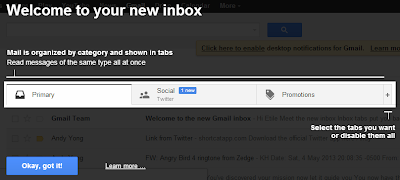
Disable Gmail Inbox Tabs

Image
If you're a Gmail user, your going to notice that recent changes to the user interface, that's right, there are several tabs now. If you've not seen it, you will soon. Google has decided to roll out the Inbox tabs to all Gmail users. Gmail's welcome message for Inbox tabs I've been a Gmail user since it's early days, and this tabs thingy really makes me uncomfortable, I believe there are others out there that has the same feeling as I am. Fortunately, as of today, there is still a way to disable the tabs. And I'll shows you how to do it. Right after you log in to Gmail, you will be introduce to to the new Inbox interface, where you will see 3 default tabs: Primary, Social & Promotions . The new Inbox tabs You emails will be parked under different tabs, this solely depend on what Google think they should be. (and there's an ads pretending to be an email) Promotions tabs Moving email between tabs You can manually move messag...